Math shouldn't be harderbecause your studentis past the third row.
ShareTheBoard turns any whiteboard, blackboard, or flip chart into a live, zoomable, accessible feed — so every proof, equation, and diagram reaches every student, wherever they're sitting, learning, or struggling.
Trusted by leading universities and schools
The problems you live with every day
Your whiteboard is brilliant.
Most of your students can't see it.
You didn't go into teaching to watch students squint from the back row. Here's what's actually happening in your classroom right now — and what ShareTheBoard was built to fix.
The students in the back can't read your board
73% of students report difficulty reading the board from their assigned seat. Lighting, angle, distance, handwriting size — everything works against them. They stop following the proof and start copying blind.
Visibility · EquityThe eraser deletes what some students never fully saw
You erase the first part of the proof to make room for the next step. Students who were one line behind just lost the thread entirely. The board has no memory. Neither does rushed note-taking.
Retention · NotesRemote and hybrid students get a blurry second-class experience
A webcam pointed at a whiteboard from ten feet away is not a teaching tool. Remote learners watch a grey smear while in-room students follow step-by-step. Distance shouldn't mean disadvantage.
Hybrid · DistanceStudents with disabilities are still being failed at the board
Visual impairments, dyslexia, ADHD, low vision — for millions of students, the whiteboard is the last unresolved accessibility gap in the classroom. It doesn't have to be.
Accessibility · ADA · DSAHeard in real classrooms
Sound familiar?
These are the situations ShareTheBoard was designed around — because we listened to teachers and students before we wrote a single line of code.
"I'm teaching calculus. By the time I've finished writing a long derivative, the students in rows 4–8 have copied the wrong thing and are already confused for the next 20 minutes."
"I have three students on disability accommodations who struggle to read the board from any seat. I've tried everything — larger markers, better lighting. Nothing works reliably."
"My remote students are essentially watching a webcam pointed at a wall. The in-room students get a completely different experience. I feel like I'm teaching two different classes."
"I've started photographing the board at the end of class instead of trying to follow during the lecture. By the time I look up, I've already missed the next step."
"I teach a class of 28. At least six students have IEPs or visual processing differences. My board work just doesn't work for them — and that's not okay."
"We've invested heavily in digital tools, but our professors still love their whiteboards. I can't make them change how they teach — but I can't ignore the accessibility gap either."
Zero disruption. Instant results.
Works with what you already have.
You don't need a new board, a special camera, or an IT project. ShareTheBoard works with the hardware you already own — and setup takes minutes, not weeks.
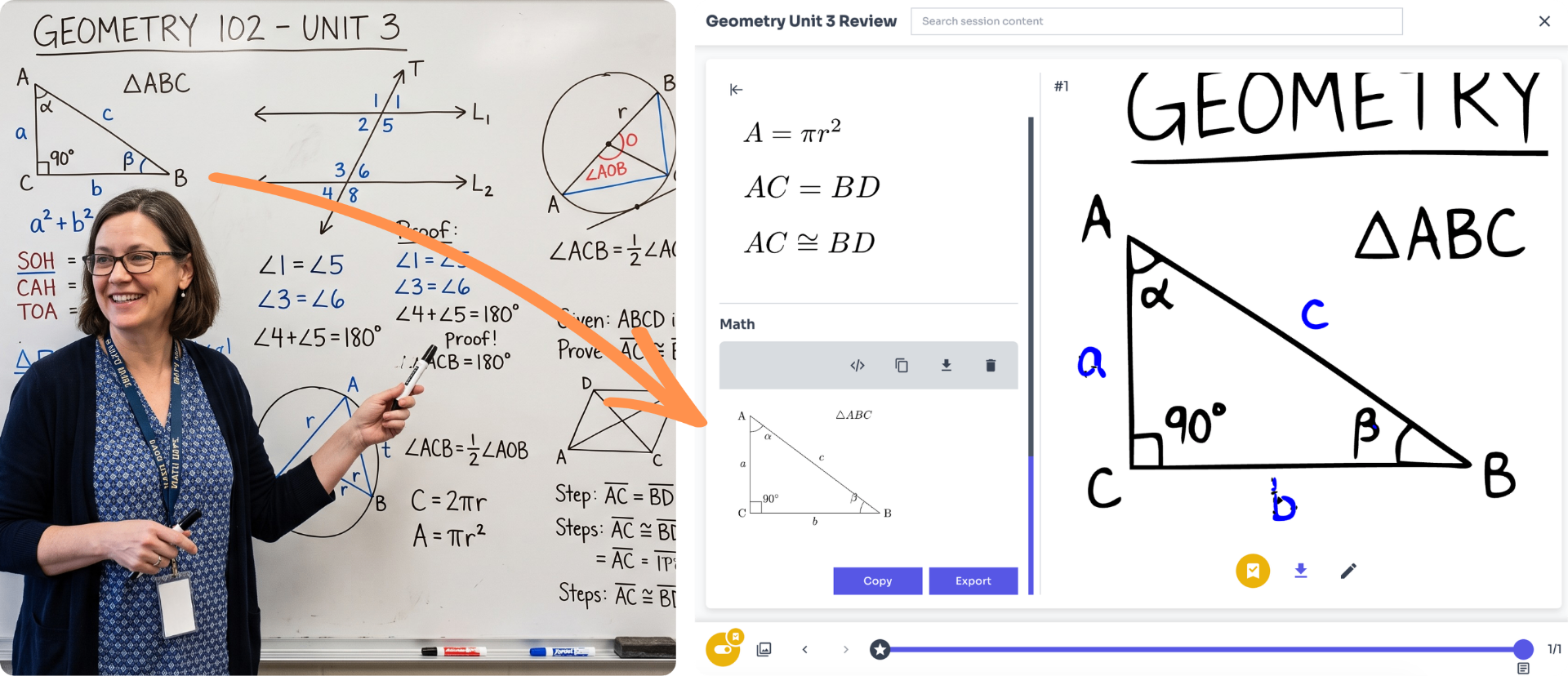
Point any camera at your board
A 1080p webcam, a document camera, professional AV classroom system. ShareTheBoard works with whatever you already have.
ShareTheBoard processes it instantly
Our AI cleans, sharpens, and streams the board in real time — legible, high-contrast, and zoomable on every device.
Students join with a link
No app download. No account required to view. Every student — in the room or anywhere in the world — opens a link and sees a crystal-clear board.
Everything is saved automatically
Sessions are archived, timestamped, and searchable. Students can rewind any moment. Content flows into your LMS. Nothing is lost to the eraser.
Every angle, solved
One tool. Every whiteboard problem.
Whether you came here because of a student you're worried about, an accessibility audit you're facing, or a hybrid class that's not working — this is the same answer.
Accessibility & inclusion
The whiteboard is the last unresolved accessibility gap in most classrooms. ShareTheBoard closes it — for visual impairments, dyslexia, ADHD, low vision, and processing differences — without modifying instruction.
Hybrid & distance learning
Remote students see the same board as in-room students — not a low-quality webcam feed. Same quality, same zoom, same experience. Hybrid classes finally work the way they should.
STEM education
Proofs, formulas, diagrams, derivations — the content where handwriting on a board is irreplaceable. ShareTheBoard makes sure the student in the back row follows every step, not just the first few.
Lecture capture & security
Sessions are automatically recorded and saved as vector-quality files. Sensitive content — exam questions, research diagrams, patient cases — stays inside your institution's control. No unauthorized photos.
AI-powered session memory
Every whiteboard session is automatically transcribed and made searchable. Students find any concept from any lecture instantly. Your institution's knowledge doesn't disappear when the eraser comes out.
Business & team collaboration
Brainstorming sessions, strategy workshops, training rooms — whiteboard content disappears the moment it's photographed. ShareTheBoard captures, archives, and shares it instantly. Remote team members see everything in real time.
Common questions
If you searched for it, here's the answer.
ShareTheBoard streams your whiteboard live to every student's device — phone, tablet, or laptop — with full zoom capability. Students in the back row see the same crisp, clear board as students in the front row, with no lag and no quality loss.
ShareTheBoard is built for accessibility by design. Students with visual impairments, dyslexia, ADHD, or low vision can zoom in independently, adjust contrast, replay any section, and access a full session archive after class — without disrupting the lesson or requiring any special accommodation request.
Point any camera at your board — a laptop webcam, a document camera, or a dedicated content camera. ShareTheBoard processes the image in real time and streams it to remote learners via a simple link. No app download required for viewers. It integrates natively with Zoom, Microsoft Teams, and Google Meet.
Yes. Every ShareTheBoard session is automatically saved as a high-resolution vector file — meaning it stays perfectly legible regardless of zoom level. Sessions are timestamped, searchable, and can be exported to your LMS. Students can rewind any moment from any lecture.
No. ShareTheBoard works with any whiteboard, blackboard, or flip chart — and any camera you already own, including a standard laptop webcam. There's no new hardware to buy and no installation required to start a session.
Document cameras capture static documents, not live board work, and don't provide individual zoom for viewers. Screen sharing only works for digital content — it can't capture a physical board. ShareTheBoard is purpose-built for live handwriting on physical surfaces, with real-time AI enhancement, individual zoom, and automatic archiving built in.
ShareTheBoard is a software platform that turns any physical whiteboard, blackboard, or flip chart into a live, accessible, digital feed. It uses a camera pointed at your board and AI processing to stream clear, zoomable board content to every viewer's device in real time — whether they're in the room, joining remotely, or watching a recording afterward. It was designed for education but works equally well in business settings.
Ready to fix it?
Every student deserves
the front row.
Book a 20-minute demo and see how ShareTheBoard turns any whiteboard into a live, accessible feed for every student — no new hardware required.